

Custom subagents & command workflows — for your AI coding harness.
Shipmates
Stop being your AI's for-loop. Give it a crew.
One command takes a GitHub issue from open to a reviewed, CI-green pull request — autonomously.
- MIT licensed
- 13 specialists
- Zero config
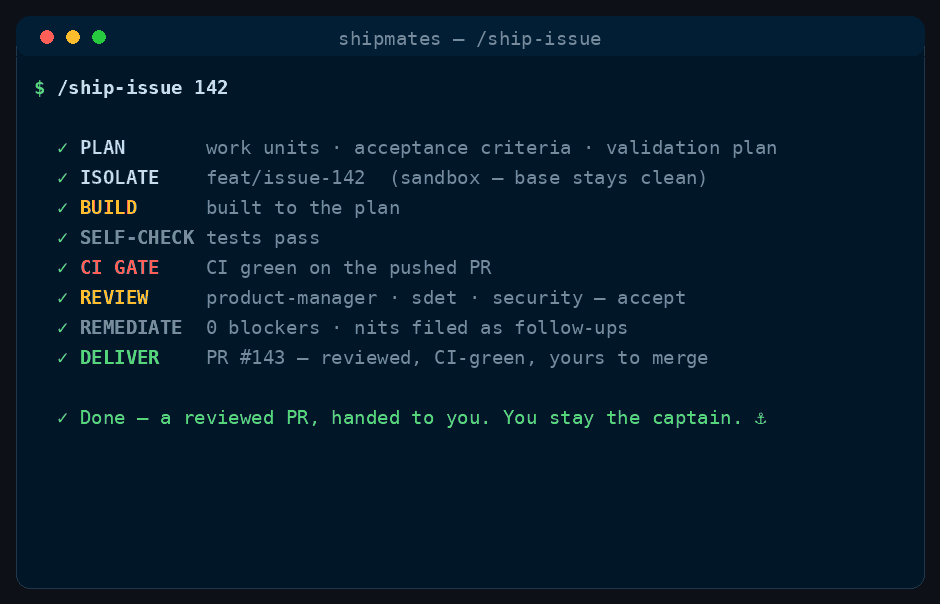
/shipmates-ship-issue runs, in order.Come aboard
Get the crew aboard
One line, no clone. Install the CLI, then bring the crew aboard in any directory.
macOS / Linux (Homebrew)
brew install saman-mb/tap/shipmatesAnywhere (Cargo)
cargo install shipmatesOnce installed, run shipmates install --harness <name> in the project directory to bring the crew aboard. See the full install reference for binary installers and per-harness paths.
Meet the crew
Thirteen specialist subagents
Domain-neutral specialists that work on anything — a game engine, a web app, a CLI. The bar they hold you to comes from your repo's README and CLAUDE.md, not the role.
-
architectStructure & schema — coupling, boundaries, migration safety.
-
senior-engineerBuilds to spec, fixes red CI, clears review defects.
-
principal-engineerPrincipal diff review — quality, tests, repo ship checklist.
-
sdetRuns the real tests/build and reports pass/fail with a defect list.
-
security-engineerThreat-models the change — authz, injection, secrets, vulnerable deps.
-
site-reliability-engineerReliability, failure modes, rollback safety — and bug root-cause.
-
performance-engineerProfiles, benchmarks, and proves the win.
-
devops-engineerBuild & delivery — reproducibility, pinning, environment parity.
-
product-managerAccepts or rejects against the acceptance criteria and your bar.
-
ux-ui-designerSpecs & reviews on-screen UI — tokens, layout, focus, a11y.
-
art-directorDirects & reviews rendered visuals — judges the picture.
-
technical-writerWrites docs from the real code; proves them with a reader test.
-
data-scientistData/model work — metrics, leakage, validation, reproducibility.
The commands
Command workflows
Reusable command workflows — each one convenes the right crew for a job and drives it to done. Open any command for its full stage-by-stage breakdown.
-
Flagship
Ship Issue
Drives issue #n from open → reviewed, CI-green PR with the whole crew.
-
Ship Epic
Ships an epic's stories in dependency-ordered waves — independent units fan out concurrently; gates pause, failures pause with state.
-
Fix Bug
Reproduce as a failing test first, root-cause, minimal fix, red→green proof.
-
Report Bug
Files a structured bug on saman-mb/shipmates from a live run — preview by default, apply when ready.
-
Plan Epics
Turns a brief into GitHub epics + linked, labelled user stories, in parallel.
-
Consolidate Issues
Cross-checks open issues against history, merges duplicates into their survivors, closes stale work, and bundles the rest by theme.
-
Harden
Threat-models a surface and ranks every finding — read-only by default, fixes opt-in.
-
Spike
De-risks a decision — prototypes options in parallel, judges them, records an ADR.
-
Migrate
Sweeps a migration across every call site, verified, no remnants left.
-
Document
Writes docs from the real code, gated on a fresh reader completing the steps.
-
Release
Cuts a release — changelog, CI-green tag, SRE rollback pre-flight, opt-in publish.
-
Polish
Iterates a visual/UI artifact to a specialist's sign-off — render → critique → fix.
-
PR Review
Runs the board against a PR the crew didn't author — reports, never repairs.
-
QA
Interactive local human QA walkthrough — complements the board and CI.
-
Onboard
Reads an unfamiliar repo and writes the agent-facing context file the crew needs.
-
Refactor
Reshapes code without changing behaviour — characterization tests pinned first.
-
Deslop
Audits the codebase for dead code, duplication and rot — risk-graded; fixes on a branch, opt-in.
-
Upgrade
Checks for a newer Shipmates release, refreshes and audits every install — apply and file only on request.
-
Auto Trunk
Runs a test-driven trunk loop — parse a goal, red→green each task, and commit to main. Plan mode is the default; commits and pushes are opt-in.
The tools
Tools the crew reaches for
A third kind of resource. A command is something you invoke with a slash; a tool is something the crew reach for on their own — implicitly, when the intent of your prompt calls for it. Never typed, never a slash command. Opt in at install with --with-tools.
-
shipmates-termgifRenders an animated terminal demo GIF of a workflow run from a small JSON spec.
-
shipmates-social-cardRenders a 1280x640 social/OG share card from a small JSON spec.
-
shipmates-pixelartRenders pixel-art icons from a JSON spec as static PNG or animated GIF.
-
shipmates-diagramRenders a curated diagram — a flow/pipeline/state machine or a sequence of actors and messages — as a committed SVG, deterministic PNG, or animated GIF.
-
shipmates-svgflowDeprecated alias for
shipmates-diagram— svgflow's flow diagram is now a kind of it. -
shipmates-badgeRender a shields-style status badge as an offline, committed SVG.
-
shipmates-sparklineRenders a short number series as a tiny inline SVG trend chart.
-
shipmates-scrubRedacts secrets and PII from a log or paste before it's shared.
-
shipmates-fixturesGenerates deterministic fake test data from a small JSON schema.
-
shipmates-domaincheckChecks domain availability via RDAP — registry-authoritative verdicts, not DNS guesswork.
-
shipmates-ghWraps the GitHub CLI with validated JSON ops — issues, PRs, CI checks, body-file hygiene.
How the voyage works
How /shipmates-ship-issue takes a GitHub issue to a pull request
It's not a clever prompt — it's a structured workflow with explicit quality gates. Eight stages, in order.
-
Plan
A planner reads the issue + your docs → build plan, acceptance criteria, validation plan, and which specialists the story needs.
-
Design specs
For UI / visual / architecture-heavy stories, the right specialist writes a spec the builders must build to. (Only if needed.)
-
Isolate
All work happens in a throwaway git worktree; your base branch never breaks.
-
Build
Parallel senior-engineer builders with non-overlapping file ownership.
-
Self-check → CI gate
The SDET runs the tests; then CI must go green on the pushed PR before anything moves on. Red? It reads the logs and fixes — bounded.
-
Acceptance board
product-manager + principal-engineer, plus gated specialists, review the pushed PR head adversarially.
-
Remediate
Any rejection loops back to a fixer, then re-selects the board from that delta — failers sit again, prior ACCEPTs carry unless the delta can invalidate them, and a seat the delta newly trips may join. Bounded, then escalates to you.
-
Deliver
Disposes non-blocking nits absorb-first (fixes cheap ones in the same PR; files only capped/batched leftovers), names a
/shipmates-hardenfollow-up if the change touched a security-relevant surface, and opens (or, opt-in, merges) the PR.
What's next
Which harnesses the crew runs on
Claude Code is fully runtime-verified; opencode, antigravity, cursor, pi and codex have captain-attested live runs; GitHub Copilot, grok-build and devin remain format-only. Every claim is auditable against the harness matrix runtime_verified record rather than a promise.
- Runtime-verified (
full)- Claude Code — the full crew and all 19 commands; crew resolve, argument passing, and
/shipmates-ship-issueend to end.
- Claude Code — the full crew and all 19 commands; crew resolve, argument passing, and
- Live run (
partial) — captain-attested live runs intools/harness_matrix.json(#497; codex #510). Granular criteria stayunknownuntil separately logged, except picrew_resolveandcommand_e2ewhich areno(#525).- opencode — full crew + all 19 commands as
.opencode/; flagship tickets #31 and #32 are closed. - antigravity (the Antigravity CLI,
agy— successor to the retired Gemini CLI) — full crew + all 19 commands as.agents/. - pi — full crew + all 19 commands at
.pi/agents/viapi-subagents;crew_resolveandcommand_e2eareno. - cursor — the 19 skills only (crew resolve N/A).
- codex — full crew + all 19 commands; crew are TOML and inherit the session's tools (no per-agent allowlist).
- opencode — full crew + all 19 commands as
- Builds, not runtime-verified (
none)- github-copilot — the full crew and all 19 commands; the crew-bearing target still without a live run (#41).
- grok-build — the full crew and all 19 commands in its own
.grok/tree: the one non-Claude target that keeps the nativedisable-model-invocationguard, and it enforces a per-agent tool allowlist too. - devin — the full crew and all 19 commands in
.devin/(Devin CLI / Devin Desktop, formerly Windsurf), with the legacy.windsurf/tree adopted on install.
- Next
- Promote
partialrows tofullby logging crew resolve, argument passing, and a named command E2E; a live run for GitHub Copilot (#41).
- Promote
Why that's credible: the crew's system prompts name no harness, and the nineteen commands ship in the Agent Skills open-standard shape rather than a Claude-specific one — so most of a port is mapping frontmatter fields, not rewriting the crew. opencode is the first test of that: every persona and workflow body carried over unchanged, and what remained was path mapping and translating an allowlist into a permission map. Details on the harness matrix.
FAQ
Frequently asked questions
What is Shipmates?
A ready-made crew of subagents and command workflows. Instead of you playing planner–builder–reviewer in a loop, a board of specialist AI agents does it — the flagship /shipmates-ship-issue takes a GitHub issue all the way to a reviewed, CI-green pull request. It is harness-agnostic: one authored crew, compiled to whichever harness you install it for. See which harnesses for where each one stands.
What are subagents and skills?
Subagents are focused AI agents defined in .claude/agents/*.md; skills are reusable workflows defined in .claude/skills/<name>/SKILL.md and invoked as commands, like /shipmates-ship-issue. Shipmates ships 13 agents and 19 commands you drop into a repo's .claude/ with shipmates install (or .opencode/ for opencode, .codex/ for codex, and so on).
Is this an official Anthropic project?
No. Shipmates is an independent, MIT-licensed community project that builds on Claude Code's public subagent and skill features. “Claude” and “Claude Code” are trademarks of Anthropic.
How is it different from just prompting Claude Code?
A raw prompt drifts; Shipmates uses a structured workflow with explicit quality gates — an isolated worktree, a mandatory green-CI gate, and a fresh reviewer that never grades its own work — so an autonomous run converges instead of wandering.
Which languages and frameworks does it work with?
Any. The agents are domain-neutral — they enforce the standard in your repo's README / CLAUDE.md, so the same crew works on a game engine, a web app, or a CLI.
Do I have to configure each agent?
No. Install once, then /shipmates-ship-issue 42. The crew picks up your project's quality bar automatically from your repo's README / AGENTS.md.
Where are the full install docs?
The install reference covers every flag and path. See also how commands work, the harness matrix, troubleshooting, and architecture pages.