
Command
/shipmates-upgrade
check for a newer release, refresh and audit every install
Check for a newer Shipmates release, refresh and audit every install — apply and file only on request.
See it run
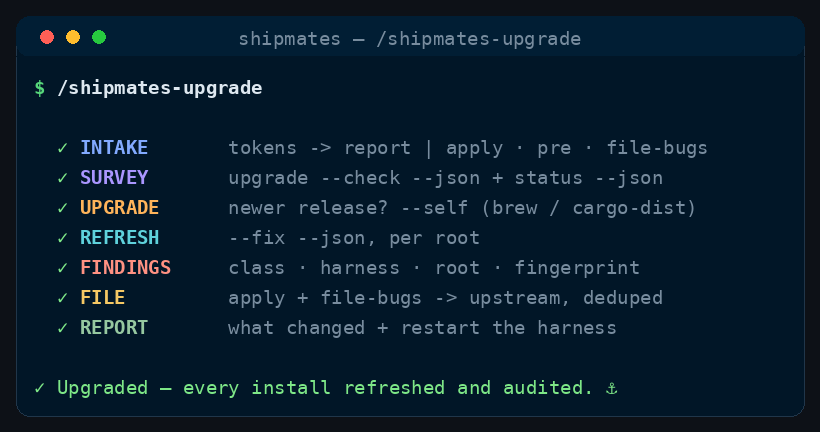
/shipmates-upgrade runs, in order.How to run it
Run it in your harness
/shipmates-upgrade [apply] [pre] [file-bugs]<angle brackets> = required · [square brackets] = optional
How it works
No crew spawns — the run drives the installed CLI (release check, self-upgrade, refresh, audit, filing) and reports what it reads back from its JSON.
Survey
Run shipmates upgrade --check --json and shipmates status --json; present the release, channel, and each install's version, state, and drift.
No spawn — the CLI reports; the run reads the JSON.
Upgrade
Show the channel command the CLI reports. Apply runs shipmates upgrade --self — brew and cargo-dist only; a source checkout gets the manual path.
Still the run — no spawn, and never a self-upgrade for a source checkout.
Repair
Apply runs shipmates upgrade --fix --json and reports what was refreshed and repaired, per root — one failing root never stops the rest.
The run reads the per-root JSON back.
File
Read findings (class, harness, root, fingerprint). Apply plus the file-bugs token runs shipmates upgrade --file-bugs; otherwise print the list and the exact command.
Never files silently — the CLI dedupes and sanitises; the run reports its URLs.
Report
Summarise what changed and any issue URLs, and remind the captain to restart the harness so a refreshed command loads.
No extra spawn — the run closes out.
Shared machinery — how commands work: worktrees, the CI gate, the review board, and merge modes.
When to use
- Shipmates itself needs upgrading, or an install has drifted and you want it surveyed before anything changes.
- Bug in your repo? /shipmates-fix-bug. Bug in Shipmates itself? /shipmates-report-bug.
The skill
The installer ships the full skill — stages, gates, config — from commands/shipmates-upgrade.md.