
Install
Install reference
Install the CLI, then drop the crew into your harness of choice.
The installer is the shipmates CLI. Install it via Homebrew, Cargo, or the binary installer script.
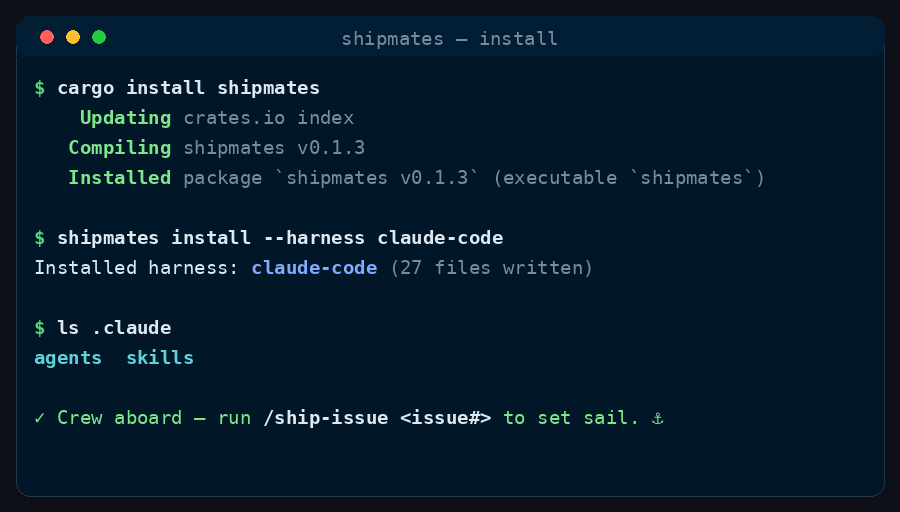
1. Install the CLI
Get the shipmates CLI via Homebrew, Cargo, or a binary installer.
macOS / Linux (Homebrew)
brew install saman-mb/tap/shipmatesAnywhere (Cargo)
cargo install shipmatesBinary Installer
curl --proto '=https' --tlsv1.2 -LsSf https://github.com/saman-mb/shipmates/releases/download/vX.Y.Z/shipmates-installer.sh | sh2. Install the crew
One command drops the crew and the nineteen commands into a harness's own tree.
shipmates install                            # prompt / default claude-code; all tools
shipmates install --harness claude-code
shipmates install --harness opencode --local
shipmates install --harness all --dir /path/to/project
shipmates update                             # refresh installed harnesses in place
shipmates update --harness claude-code
Installs into your global home directory by default. Use --local for the current directory, or --dir /path/to/project for a specific root. When --harness is omitted, shipmates install reports any detected harnesses as a hint, then prompts in a terminal (Enter defaults to claude-code) or installs claude-code only in non-interactive runs — pass --harness NAME or --harness all to opt in. Canonical user-scope global steering is written into home instruction files only when the install target is the home directory (default / --global), not on --local or --dir. The crew and the nineteen commands land in the exact tree your harness reads, in its own native format — nothing is downloaded; the CLI compiles the payload from sources built into the binary. Full per-harness paths are in the table below.
After you upgrade the shipmates binary, run shipmates update to refresh an existing install. It overwrites payload files to match the new binary, keeps previously installed tools unless you pass --with-tools, and prints an upgrade summary.
One thing to know up front: seven harnesses take the full crew (claude-code, opencode, antigravity, codex, github-copilot, pi, grok-build). The two skill-only harnesses (cursor, windsurf) have no native subagent directory, so only the nineteen commands land — the workflows still run, just without the named specialists.
3. Tools
A plain install ships the full toolbox. Pass --with-tools none for crew + commands only, or name a subset.
shipmates install --harness claude-code              # crew + commands + all tools
shipmates install --harness claude-code --with-tools termgif,scrub
shipmates install --harness opencode --with-tools all   # same as omitting the flag
shipmates install --harness codex --with-tools none     # explicit crew-only
A tool is the third kind of shipmates resource, alongside the crew and the commands. Unlike a command, a tool is never invoked with a slash — the crew reach for it on their own when the intent of your prompt calls for it. shipmates-termgif, the first tool, renders a polished animated terminal demo GIF of a workflow run from a small JSON spec — see its tool page. Former short names (termgif, scrub) still select the namespaced tool at install.
Omitting --with-tools installs every bundled tool. Pass none for a minimal crew-only install, all explicitly (same as the default), or a comma-separated list for a subset. Each tool maps to the harness's own native tool surface: a native code tool on opencode (.opencode/tools/<name>.ts); an agent-invoked Agent Skill in the shared .agents/skills/ tree on the targets that read it, pinned agent-only on Claude Code with user-invocable: false so it never shows up as a slash command; and, on grok-build, an agent-invoked skill in its own .grok/skills/ — still typeable in the slash menu, because the harness offers no way to hide one from the menu without hiding it from the model.
Choose an install root
Pick global, local, or an explicit directory.
shipmates install --harness claude-code --global   # global home directory (default)
shipmates install --harness claude-code --local       # current directory
shipmates install --harness claude-code --dir /path/to/project
--global selects the global home directory explicitly. --local selects the current directory. --dir PATH selects an explicit root; it cannot be combined with either mode flag. The harness's own tree is created if it doesn't exist.
What the installer does
- Compiles the payload from its built-in canonical sources (
commands/+crew/), rendering each command and persona into the harness's own dialect — where its agents live, what its session metadata is called, which project-instructions file it reads. - Writes into the tree each harness reads. Three harnesses (
codex,antigravity,github-copilot) share one.agents/skills/tree — rendered once, byte-identical, so a multi-harness install has a single copy, not three.cursorships to its own.cursor/skills/, because that is the only tree its slash-command picker reads. Crew stay harness-native (.codex/agents/,.github/agents/,.agents/agents/,.pi/agents/,.grok/agents/). The rest keep their own root:.claude/,.grok/,.pi/skills/,.windsurf/, and opencode's.opencode/commands/. - Emits the nineteen skills whole — whatever a skill bundles comes along with its
SKILL.md— and, on the seven crew-bearing harnesses, the thirteen crew personas:agents/*.mdon claude-code, opencode, antigravity, pi and grok-build,agents/*.tomlon codex, andagents/*.agent.mdon github-copilot. The two skill-only harnesses (cursor, windsurf) get the skills and nothing else. - Writes an install receipt at
<target>/.shipmates/receipts/<harness>.json. The receipt records Shipmates version, harness, resolved layout, and each file Shipmates owns with its SHA-256 hash. - Reinstalling is idempotent: unchanged receipt-owned files are skipped; changed receipt-owned files get a sibling
.bak-…backup before replacement. New files are added. Symlinked target paths are rejected. - A file already at a payload path is classified by its own frontmatter. One that names the artifact installed there is adopted — backed up, rewritten from the payload, and claimed in the receipt. One that does not is yours: install stops before writing anything and names the same
shipmates install … --forceinvocation you ran (harness, root, tools), which backs each up and replaces it. - The payload is the one compiled into the binary.
cargo run -- installinside a Shipmates checkout uses that checkout; any other source tree must be asked for with--from-cwdorSHIPMATES_SRC=/path/to/checkout. - Warns about files recorded by the previous receipt but absent from the new payload instead of silently deleting them.
CLI reference
Every flag is also on shipmates help <command> with examples. Start with shipmates --help.
shipmates targets                 # harness names for --harness / --target
shipmates install                 # first-time install (prompt / default claude-code)
shipmates update                  # refresh after upgrading the shipmates binary
shipmates doctor [--fix]          # health check; --fix repairs drift
shipmates uninstall               # remove a receipt-owned install
shipmates build|check             # contributor digest / payload tooling
Where (shared by install, update, uninstall, doctor): omit for the global home directory; --local for the current directory; --dir PATH for an explicit root. The three are mutually exclusive.
| Command | Flag | Default | Effect |
|---|---|---|---|
install | --harness NAME | prompt / claude-code | Harness tree to install (all = every target). Omit to prompt (TTY) or default to claude-code (non-interactive); detection is a hint only. |
--with-tools NAMES|all|none | all bundled tools | Omit for every tool; none for crew-only; names or all for a subset. | |
--global / --local / --dir PATH | global home | Install root (see Where above). Global steering lands in home dir only on a global target. | |
--force | off | Overwrite colliding files even when not receipt-owned. | |
--no-migrate | off | Skip layout-migrate and identity-rename sweeps. | |
--from-cwd | off | Build from this directory's crew/, commands/, toolbox/ instead of the embedded payload. | |
update | --harness NAME | all installed | Refresh one harness, or omit to refresh every receipt (interactive when several). |
--with-tools NAMES|all|none | keep receipt | Omit to keep previously installed tools; pass to replace the set. | |
--global / --local / --dir PATH / --from-cwd | global home | Same Where / Source flags as install. | |
uninstall | --harness NAME | only if one receipt | Required when more than one harness is installed under the root. |
--global / --local / --dir PATH / --from-cwd | global home | Same Where / Source flags as install. | |
doctor | --harness NAME | claude-code | Which install to diagnose. |
--fix | off | Repair missing or drifted Shipmates-owned files. | |
--no-migrate | off | With --fix, restore files but leave legacy / pre-prefix names alone. | |
targets | — | — | List harness names this binary can install. |
build / check | --target NAME | claude-code | Contributor: harness to build or digest-check. |
--update (build only) | off | Contributor: regenerate tests/payload-digests/ (not a user install refresh). |
Per-harness paths
Each root verified against first-party docs. Three harnesses follow the open Agent Skills standard and share one .agents/skills/<name>/SKILL.md tree (codex, antigravity, github-copilot); claude-code, cursor, pi, grok-build and windsurf read their own <root>/skills/, and opencode uses commands/.
| Harness | Tree installed | Commands land at | Subagents | First-party doc |
|---|---|---|---|---|
claude-code | .claude/ | skills/<name>/SKILL.md | agents/<name>.md | code.claude.com/docs/en/skills |
opencode | .opencode/ | commands/<name>.md | agents/<name>.md | opencode.ai/docs/commands |
github-copilot | .github/ + .agents/ | .agents/skills/<name>/SKILL.md | .github/agents/<name>.agent.md | docs.github.com/en/copilot/concepts/agents/about-agent-skills |
codex | .codex/ + .agents/ | .agents/skills/<name>/SKILL.md | .codex/agents/<name>.toml | developers.openai.com/codex/build-skills |
cursor | .cursor/ | .cursor/skills/<name>/SKILL.md | none | cursor.com/docs/skills |
antigravity | .agents/ | skills/<name>/SKILL.md | agents/<name>.md | antigravity.google/docs/cli/plugins |
windsurf | .windsurf/ | skills/<name>/SKILL.md | none | docs.windsurf.com/windsurf/cascade/skills |
pi | .pi/ | skills/<name>/SKILL.md | agents/<name>.md — resolved by the third-party pi-subagents extension; core pi documents no subagent schema | github.com/earendil-works/pi/blob/main/packages/coding-agent/docs/skills.md (skills doc is first-party; the crew doc is third-party) |
grok-build | .grok/ | skills/<name>/SKILL.md | agents/<name>.md | docs.x.ai/build/features/skills-plugins-marketplaces |
opencode takes the nineteen as flat commands/<name>.md files rather than skill directories. That is a safety decision, not a formatting one — opencode's skills are model-invoked and its SKILL.md has no disable-model-invocation equivalent, so commands/ is what keeps the nineteen user-invoked only. The reasoning is on the harness matrix.
One shared skills tree. codex, antigravity, and github-copilot read Agent Skills from the open .agents/skills/ location, so shipmates renders the nineteen skills once, in a neutral dialect, and writes them there — one source of truth, byte-identical across all three. Install several into one repo and you get a single .agents/skills/, not three divergent copies. cursor reads that open tree as well, but only its first-party .cursor/skills/ feeds the slash-command picker, so its skills ship there and nowhere else. The crew, whose formats differ, stay harness-native: .codex/agents/<name>.toml, .github/agents/<name>.agent.md, and .agents/agents/<name>.md for antigravity (the agy CLI, successor to the retired Gemini CLI), and .pi/agents/<name>.md for pi (resolved by the third-party pi-subagents extension). pi, grok-build, windsurf and claude-code keep their own native trees — their commands ship harness-specific guards (disable-model-invocation, tool scoping, and /skill: routing on pi).
Verify
ls .claude/agents
ls .claude/skills
You should see thirteen .md files in agents/ and nineteen directories in skills/ each holding a SKILL.md — then run /shipmates-ship-issue. Bare or partial arguments show every parameter with its default (and the other choices for enums) and ask OK or what to change — not a long form; a fully specified argument string skips straight to the workflow. The same intake applies to every catalogue command.
New to the mechanics? How commands work explains the isolated worktree, the CI gate, the acceptance board, and merge modes that every command shares.
For an opencode install, check the two directories it uses instead:
ls .opencode/agents
ls .opencode/commands
Thirteen .md files in agents/ and nineteen in commands/. Claude Code is fully runtime-verified; opencode, antigravity, cursor, pi and codex have captain-attested live runs (partial in the matrix); pi crew_resolve and command_e2e are no (#525, closed 2026-09-21). GitHub Copilot, grok-build and devin remain format-only. Live status — including whether crew resolve, argument passing, and a named command E2E are proven — is recorded in tools/harness_matrix.json under runtime_verified. See the harness matrix.
Health, reinstall, and uninstall
Receipts make upgrades repeatable and removal safe.
shipmates doctor
shipmates doctor --local
shipmates doctor --dir /path/to/project
shipmates doctor --fix
shipmates doctor --fix --no-migrate
doctor uses the global home directory and the claude-code harness by default; pass --harness to check another harness, --local for the current directory, or --dir for an explicit root. It does not discover harnesses from receipts. It reports whether the harness tree is present, whether expected files are missing, whether installed files are modified or unreadable. It is read-only unless you pass --fix.
--no-migrate requires --fix. shipmates doctor --fix --no-migrate restores receipt-owned missing or modified files but leaves superseded legacy command files in place. Install migrates receipt-owned legacy files; a receipt-less tree preserves existing legacy files unless --force is explicit. A missing receipt reports ownership unknown and preserves existing files; an invalid receipt is a problem and --fix refuses ownership-based repair.
Interrupted updates leave a sibling {name}.bak-<secs>-<pid>-<n> beside a missing payload path. shipmates doctor --fix restores that path from a bak whose bytes match the current payload, even when the receipt does not list it yet. A bak that does not match the payload is left in place with an explicit mv <bak> <dest> hint — doctor will not invent bytes from a non-matching undo.
A $HOME/.agents/skills/ tree written by an earlier Shipmates is superseded: every global install now lands in the harness's own user-scope tree, so no current payload writes that shared location and no receipt claims it. A harness that still reads legacy locations loads each name twice, one [Skill conflicts] line per command. shipmates doctor reports this as a Superseded skill tree problem for every harness, and shipmates upgrade counts the same drift and shipmates upgrade --fix retires it; shipmates doctor --fix — or a plain shipmates install — retires the files whose own declaration proves they are Shipmates' — both the payload name: and Shipmates' own description: — to a .shipmates-backup/ tree, so the tree stays recoverable. Classification is per file: a rendered tool skill is its SKILL.md and the script it bundles (termgif.py, badge.py, …), and every file that proves it is ours is retired even when a sibling sits behind a symlink — the symlinked file itself is left exactly as found. An entry at a name the current catalogue no longer ships — a retired ship-* name or a removed tool — is reported when its SKILL.md carries Shipmates' own description:, and is never deleted; a file sitting at a payload name that declares a different identity is never touched either. doctor names every applicable remedy in one line — the --fix instruction for the files that are ours, the exact removal command for the foreign ones, a note that a symlinked entry was left as found, and a superseded name outside the catalogue that was detected and left alone — so a mixed tree never hides one remedy behind another.
The receipt lives below the target at .shipmates/receipts/<harness>.json. It records harness, layout, version, and SHA-256 hashes for files Shipmates owns. shipmates uninstall defaults to the global home directory and discovers the harness only when exactly one valid receipt exists. With multiple valid receipts, pass --harness; an explicit missing or invalid receipt fails closed. It removes only unchanged, receipt-owned files and leaves modified, unreadable, or unmanaged files untouched.
shipmates uninstall
shipmates uninstall --local
shipmates uninstall --dir /path/to/project
Do not remove the whole harness directory: it may contain files the user owns. Uninstall is receipt-scoped, validates all sibling receipts first, and fails safe when ownership is uncertain. A shared-only block preserves the shared file while removing the selected receipt.
Uninstall
shipmates uninstallUninstall defaults to the global home directory; use --local or --dir for another root. It uses the receipt at <target>/.shipmates/receipts/<harness>.json. With one valid receipt, --harness is optional; with multiple valid receipts, specify it. Missing or invalid receipts fail closed, while no receipt directory is a no-op. It removes only files recorded there whose contents still match the hashes. Modified, unreadable, and unmanaged files are warned about and left untouched. The command never guesses by deleting a whole harness tree.