
Tool
shipmates-diagram
Draws a curated diagram — a flow/pipeline/state machine, or a sequence of actors and messages — as a committed SVG, a deterministic PNG, or an animated GIF, from a tiny JSON spec.
Shipmates: Render a curated diagram — a box-and-arrow flow, pipeline, or state machine, or a sequence/interaction with actors and message arrows — from a small JSON spec, as a committed SVG, a deterministic PNG, or an animated GIF. No browser, no mermaid runtime, no headless renderer; the SVG is assembled as text and the PNG/GIF are repainted from the same primitives. Reach for this whenever a task calls for a diagram to explain a design, pipeline, request path, state machine, or interaction in a README or docs page rather than describing it in prose or leaving a mermaid block for something else to render. Never a slash command; the crew reach for it implicitly when the intent calls for one.
What it does
diagram turns a small JSON spec into a clean, theme-exact diagram in whichever form the doc needs: a self-contained SVG assembled as text (no browser, no mermaid runtime, no headless renderer), a deterministic PNG repainted from the same primitives, or a tasteful animated GIF. The SVG path is pure standard library; PNG and GIF provision Pillow for themselves the first time they run, and raster text uses an embedded font so it is identical on every host. Every form is byte-for-byte deterministic — the same spec always produces the same file — so the output is safe to commit next to the docs it illustrates.
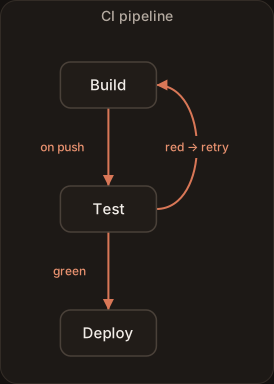
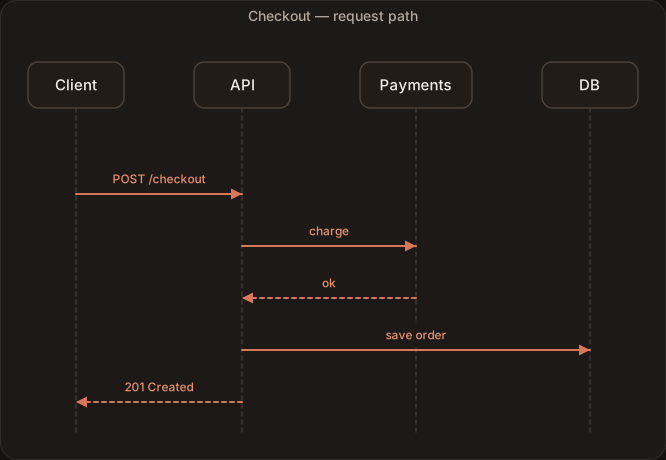
It is the evolution of the older svgflow tool (now a deprecated alias that forwards here). A flow diagram — the default — lays nodes out in a column ("direction": "down") or row ("direction": "right"), each box sized to its label, with straight spine arrows and side-bowed skips, back-edges, and self-loops. A sequence diagram draws actors across the top with dashed lifelines and directional message arrows. The builder is chosen by an explicit kind, or routed from a prompt/intent string through a plain keyword map — no model call. It is a tool, not a command: the crew reach for it on their own when the natural artifact of a task is a diagram of how the pieces connect or talk — a CI pipeline, a request path, a state machine, a service interaction — instead of a paragraph of prose or a mermaid block something else has to render. It draws a curated set of hand-laid types — there is no automatic graph layout — and the PNG is a faithful re-render of the same spec, not a pixel copy of the SVG.
Examples
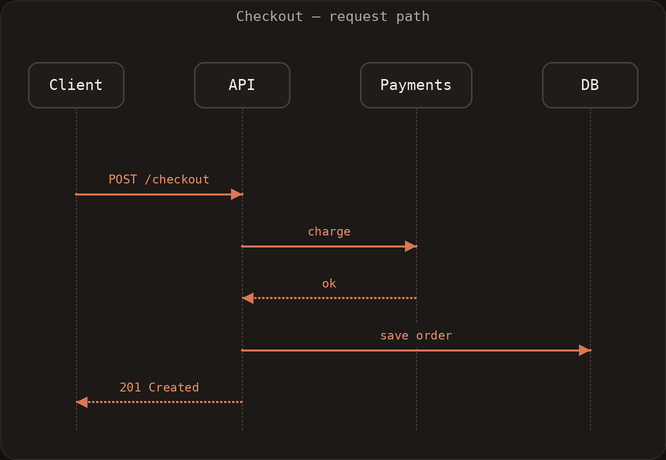
A few things shipmates-diagram can produce, each from a small spec of its own. If you've set prefers-reduced-motion, any animation shows its final frame instead.

How the crew reach for it
Tools ship with a plain install; refresh one with shipmates install --harness <name> --with-tools diagram. Use --with-tools none for crew-only. Once installed it sits alongside the crew as a capability they invoke implicitly; there is no slash command to type.
The renderer and its instructions are bundled together, so wherever the tool lands the agent has both the diagram.py script and the spec format it needs to drive it — python3 diagram.py --spec spec.json --out flow.svg for SVG, or --out flow.png / --out flow.gif for a deterministic raster. The format is inferred from the extension, or set with --format; --provision places the raster dependency ahead of time.
Reference
- Name
shipmates-diagram- Description
- Shipmates: Render a curated diagram — a box-and-arrow flow, pipeline, or state machine, or a sequence/interaction with actors and message arrows — from a small JSON spec, as a committed SVG, a deterministic PNG, or an animated GIF. No browser, no mermaid runtime, no headless renderer; the SVG is assembled as text and the PNG/GIF are repainted from the same primitives. Reach for this whenever a task calls for a diagram to explain a design, pipeline, request path, state machine, or interaction in a README or docs page rather than describing it in prose or leaving a mermaid block for something else to render. Never a slash command; the crew reach for it implicitly when the intent calls for one.
- Bundled files
diagram.py- Install
shipmates install --harness <name> --with-tools shipmates-diagram
Where this lives
This page is generated from toolbox/shipmates-diagram/tool.md. Opt in at install with --with-tools shipmates-diagram and the installer copies the tool — instructions and bundled files — into the harness's skills tree.