All orders

Order

/plan-epics

briefs → GitHub epics + user stories

Turn a brief (or several) into a tracked backlog — GitHub epics + linked, labelled user stories, with a product-manager subagent authoring each epic's stories in parallel.

Turn the brief(s) in $ARGUMENTS into a tracked backlog: one or more epics (labelled epic), each broken into user stories (labelled user-story + area tags), created as GitHub issues and cross-linked. When the work spans multiple epics, a product-manager subagent authors each epic's stories in parallel — one PM per epic.

Input ($ARGUMENTS): the brief(s). May be inline text, a path to a file/dir of briefs, or several briefs separated by --- or numbered. If it's empty, ask the user for the brief before doing anything.

How to run it

Run it in Claude Code

/plan-epics <brief text | path to a brief file | several briefs> [area/label hints] [dry-run]

<angle brackets> = required · [square brackets] = optional

Step by step

The stages

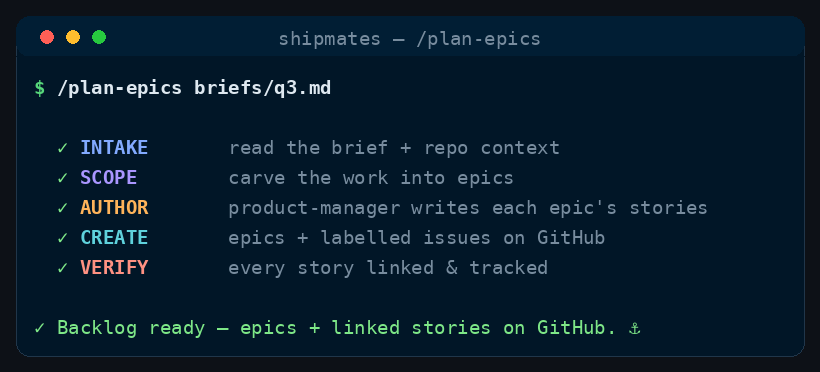
Five stages, in order.

  1. Stage 0 — Intake & context (orchestrator)

    1. Parse $ARGUMENTS into one or more briefs; read any referenced files/dirs.
    2. Gather repo context so the backlog fits the project: README / CLAUDE.md (domain, conventions, quality bar), gh label list, and the existing open issues (gh issue list --state open --limit 300 --json number,title,labels) so you can dedupe against work already tracked.
    3. Decide the shape: does the brief map to one cohesive epic, or several independent ones? (A brief naming multiple distinct capabilities → multiple epics.)
    4. If a brief is too vague to scope responsibly, ask the user ONE round of clarifying questions before creating anything — don't invent a backlog from thin air.
  2. Stage 1 — Scope into epics

    Crew: product-manager (agent: product-manager, one)

    Spawn ONE product-manager with all briefs + the Stage 0 context. It returns the epic set (writes no issues) — for each epic: a crisp title, the why/goal (the outcome, not the output), high-level scope and non-goals, dependencies/build-order between epics, and suggested area label(s). One brief may yield one epic; that's fine.

  3. Stage 2 — Author each epic's stories

    Crew: product-manager (agents: product-manager × N, parallel)

    Spawn one product-manager subagent per epic, in a single message so they run concurrently. Give each: its epic (title/why/scope), the full repo context, the OTHER epics' titles (for cross-epic dependencies), and the existing-issues list (to dedupe). Each returns its epic's user stories as structured data (no gh calls) — per story:

    • title (short, outcome-shaped),
    • description (the user value: "As a … I want … so that …" where it fits),
    • acceptance criteria — explicit and checkable, Given/When/Then where natural,
    • area label(s), and dependency order (blocked_by other stories where real).

    Tell each PM: stories should be INVEST (independent, negotiable, valuable, estimable, small, testable) — one shippable slice each, vertically sliced over horizontal layers, dependency-ordered, and NOT duplicating an existing open issue. Prefer a handful of well-formed stories over a long shallow list. To avoid clobbering, each PM returns its data inline (no shared temp filenames).

  4. Stage 3 — Create the issues (orchestrator, deterministic)

    If DRY_RUN: print the epic→story tree (titles, criteria, labels, order) and STOP.

    Otherwise, in this order (numbers must exist before they're referenced):

    1. Labels — ensure epic, user-story, and any needed area:* exist (gh label create the missing ones; note which you created). Don't spam the namespace — only labels you'll actually use.
    2. Epics firstgh issue create each epic: body = the why/goal + scope/non-goals + a story checklist placeholder + cross-epic dependency notes + the trailer + epic label. Capture each epic's issue number.
    3. Storiesgh issue create each story: body = description + acceptance criteria + Part of #<epic> + Blocked by #<n> where known + the trailer + user-story and area labels. Capture each story number.
    4. Backfill the epic checklists — edit each epic body, replacing the placeholder with - [ ] #<story> lines for its stories, so the epic tracks its children and GitHub cross-links them.
  5. Stage 4 — Verify & report

    • Verify every story carries Part of #<epic> matching its epic, and every epic's checklist lists all its stories (re-fetch and grep; don't assume).
    • Report a tree: each epic (title + link) → its stories (title + link), with counts, any labels created, a recommended build order, and anything skipped as an existing duplicate.

Config (defaults — override only if the repo clearly needs it)

  • REPO = current repo (gh repo view --json nameWithOwner -q .nameWithOwner).
  • EPIC_LABEL = epic; STORY_LABEL = user-story (create if missing).
  • AREA_LABELS = derived from the repo's existing gh label list (prefer the area:* family). Create a new area label only when a story clearly needs one that doesn't exist — and say which you created.
  • Issue-body trailer: Claude-Session: ... on every epic and story (read from the harness/session context; do not invent).
  • DRY_RUN = on if the caller says "dry run" / "preview": print the full plan and create NOTHING.

Guardrails

  • The orchestrator owns all gh calls; the product-manager agents only return structured story data — they never create issues themselves.
  • Dedupe. Never re-file work already tracked in an open issue; note what you skipped and why.
  • Don't over-scope. A brief becomes the smallest coherent set of epics/stories that delivers it — no speculative epics the brief didn't ask for.
  • Respect DRY_RUN — when set, create nothing.
  • Every epic and story must be individually valuable and traceable (Part of #), so the backlog is ready to hand to /ship-issue one story at a time.
  • If a role doesn't resolve to a .claude/agents/*.md, fall back to general-purpose with the product-manager brief inlined, and note the fallback.

Where this lives

This page is generated from skills/plan-epics/SKILL.md. The installer copies it to ~/.claude/skills/plan-epics/SKILL.md for every project, or .claude/skills/plan-epics/SKILL.md inside a single repo.

View skills/plan-epics/SKILL.md on GitHub